📚 CMPE1250: Tutorial: Driving a 4-Digit UART 7-Segment Display with STM32G031K8
📋 Module Overview
- The module has a built-in microcontroller that accepts UART commands.
- You don’t need to multiplex segments manually—just send ASCII/hex commands over USART.
- Typical pins exposed:
- VCC: 5V
- GND
- RXD (receives UART data from STM32 - 3.3V logic supported)
- TXD (unused)
1️⃣ Wiring to STM32 Nucleo G031K8
Part 2 – Wiring Connections (STM32G031K8 ↔ 4-Digit UART Display)
| Display Module Pin | STM32 Nucleo G031K8 Pin | Notes |
|---|---|---|
| VCC | 5V (CN7 pin 8) | Check module spec; many accept both 3.3V and 5V |
| GND | GND (CN7 pin 7 or CN10 pin 8) | Common ground is essential |
| RXD | USART1_TX | STM32 transmits data to display |
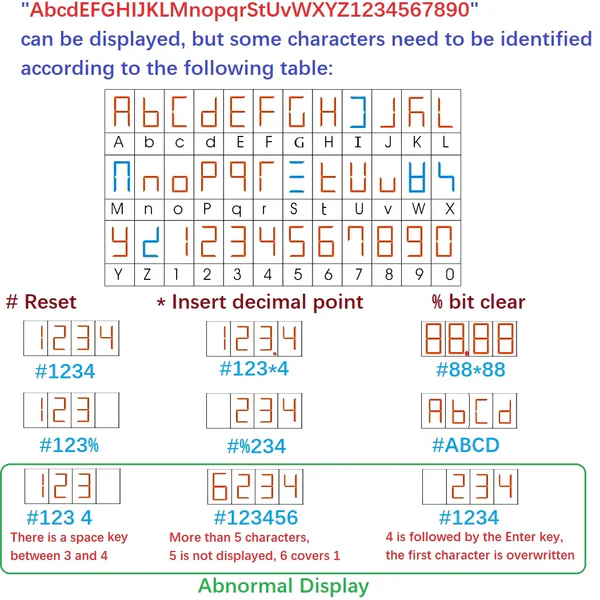
2️⃣ Command Protocol
3️⃣ Using sprintf to print to an array
🧵 sprintf vs printf in Embedded C
| Feature | sprintf |
printf |
|---|---|---|
| Purpose | Formats data into a string buffer | Sends formatted output to standard output |
| Output Target | A char[] buffer (you define it) |
Typically stdout (debug console) |
| Use Case | Pre-formatting data for UART, LCD, or display modules | Debugging or direct console output |
| Memory Usage | Slightly more (due to buffer allocation) | Depends on implementation |
| Flexibility | Can be redirected to any output (UART, SPI, etc.) | Limited to environments with stdout support |
Example:
    char buffer[5];           // 4 digits + null terminator
    uint16_t value = 75;
    sprintf(buffer, "%#04u", value);  // buffer = "0075"
    //Sent to UART
This ensures:
- 0 → “0000”
- 75 → “0075”
- 999 → “0999”
- 9999 → “9999”
4️⃣ Student Activity
-
Show a 4-digit counter that starts at
0000and increments every 500[ms] -
Make sure the counter rolls from
9999to0000 -
Advanced: Add 2 buttons to change the counter to count
UPorDOWN. Keep the rolling consitent if it’s counting UP or DOWN.