📚 Chapter 3 – Planning Business Intelligence Solutions
1️⃣ The Planning Mindset: Kimball & RAD Principles
Planning a BI solution requires finding a practical balance between unguided development and protracted over-planning.
- The Paradox of Stopping: As data warehouse pioneer Ralph Kimball noted, “The most important first step in designing a DW/BI system, paradoxically, is to stop.” Before writing DDL or building packages, developers must pause to analyze business requirements, workflows, and underlying data structures.
- Top-Down vs. Bottom-Up:
- Top-Down (Bill Inmon): Analyzes enterprise-wide data needs to construct a comprehensive data warehouse before building dependent reporting marts. Highly rigorous, but often expensive, slow to deliver value, and prone to shifting enterprise requirements.
- Bottom-Up (Ralph Kimball): Targets a single core business process at a time (e.g., sales, inventory), incrementally expanding the warehouse with shared, conformed dimensions.
- Rapid Application Development (RAD): DMIT2507 utilizes bottom-up design paired with RAD. By focusing on the top 80% of business value in roughly 20% of the total time, teams deploy quick, testable prototypes to gather client feedback early.
2️⃣ The Planning Lifecycle & Feasibility Gates
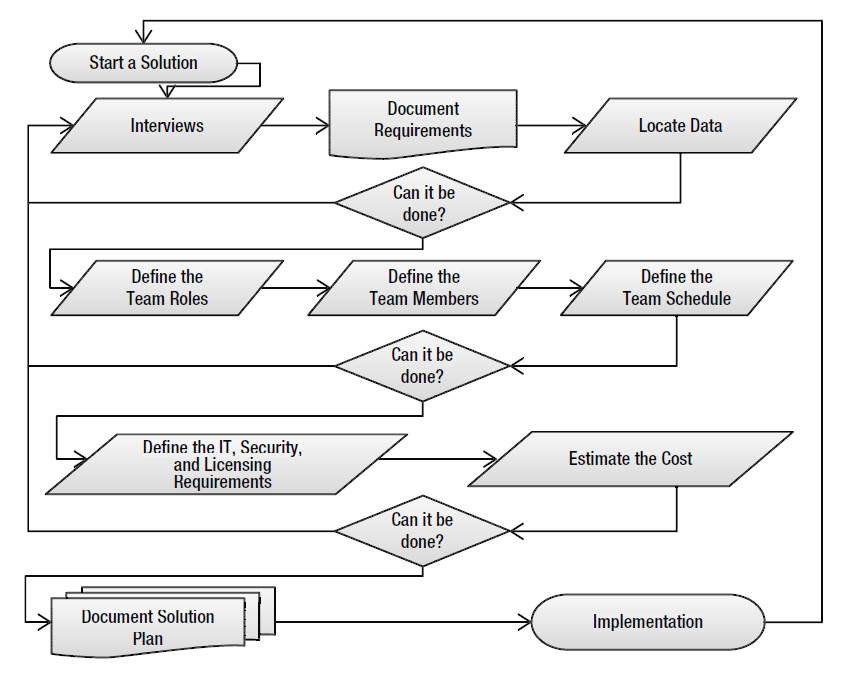
The BI planning cycle uses evaluation checkpoints (“Can it be done?”) to halt or pivot projects before resources are wasted:
- Stakeholder Interviews: Clarify goals, pain points, end-user roles, and desired business questions.
- Requirements Documentation: Formalize project charters, expectation logs, naming conventions, and issue tracking.
- Data Identification & Location: Audit available source data across tables, flat files, or legacy stores.
- Gate 1: Does the underlying data actually exist and support the questions the client wants answered?
- Team & Schedule Definition: Assign required operational roles and estimate delivery milestones.
- Gate 2: Can the project be staffed and completed within the expected timeline?
- IT, Security & Licensing Assessment: Validate hosting environments, compliance boundaries, and tooling.
- Gate 3: Can the solution run within available infrastructure, security rules, and budget?
- Solution Plan Sign-off & Implementation: Finalize technical mapping worksheets and initialize project solutions in Visual Studio.
3️⃣ Prioritizing Requirements: The Four-Quadrant Matrix
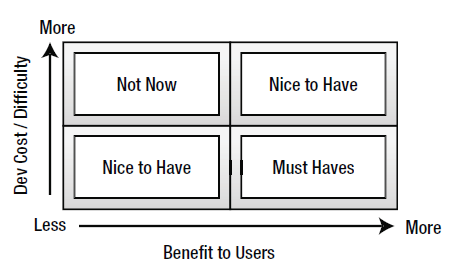
Stakeholder wishlists almost always exceed budget and schedule limits. The Four-Quadrant Matrix evaluates requested features by plotting Business Value against Development Difficulty / Cost:
| Quadrant | Criteria | Action Strategy |
|---|---|---|
| Must Haves | High Benefit, Low to Moderate Cost | Include in the current iteration; forms the baseline prototype |
| Nice to Have | High Benefit, High Cost OR Moderate Benefit, Low Cost | Scrutinize carefully; include only if budget and milestones allow. |
| Not Now | Low Benefit, High Cost | Exclude immediately; consider for future solution versions. |
| Frivolous | Low Benefit, Low Cost | Exclude. This causes feature creep—busywork that adds little business value (“When in doubt, leave them out!”). |
4️⃣ Workday Capacity & Schedule Estimation
Planning estimates must reflect real productive time rather than theoretical capacity.
- The 6-Hour Rule: In an 8-hour workday, an engineer averages 6 productive hours (with 2 hours consumed by email, team syncs, meetings, and context-switching).
-
Estimation Formula:
\[\text{Production Days} = \frac{\sum \text{Task Estimated Hours}}{6\text{ hours/day} \times \text{Available Team Members}}\] - Risk & Overrun Buffer: Add 10% to 20% contingency to schedules and cost budgets to offset dirty data, network firewalls, and missing documentation.
5️⃣ Team Roles in a BI Initiative
RAD teams generally function best with 6 to 8 specialized roles (frequently fulfilled by multi-skilled cross-functional members):
- Solution Sponsor: Executive client liaison who secures funding, champions user adoption, and signs off on project success.
- Solution Manager / Planner: Coordinates timelines, resolves blockers, and manages scope expectations.
- Data Warehouse Developer: Designs relational star/snowflake schemas, manages grain, and implements surrogate key structures.
- ETL Developer: Builds data extraction, transformation, data cleansing, and loading pipelines (SSIS).
- Cube Developer: Configures multidimensional models, measures, hierarchies, and aggregations (SSAS).
- Report Developer: Crafts intuitive, interactive visualizations and tabular layouts (SSRS, Excel, Power BI).
- Tester: Verifies data accuracy, audit logs, and reconciles fact calculations back to source data.
- Technical Writer / Trainer: Maintains technical specifications, updates changelogs, and leads end-user onboarding.
6️⃣ Hands-On Lab: Scaffolding Publication Industries
In this lab, you audit the pubs transactional database (OLTP) to plan the DWPubsSales analytical warehouse (OLAP).
Step 1: Data Audit in SQL Server Management Studio (SSMS)
Connect to your local SQL Server instance and query the transactional tables in pubs:
USE pubs;
GO

-- 1. Must Have: Fact Core (Sales volume and transactions)
SELECT TOP 1000 stor_id, ord_num, ord_date, qty, payterms, title_id
FROM dbo.sales;

-- 2. Must Have: Dimensional Attributes (Product and Outlet details)
SELECT TOP 1000 title_id, title, type, pub_id, price
FROM dbo.titles;

SELECT TOP 1000 stor_id, stor_name, state
FROM dbo.stores;

SELECT TOP 1000 pub_id, pub_name, country
FROM dbo.publishers;

-- 3. Must Have: Many-to-Many Bridge Table
SELECT TOP 1000 au_id, title_id, au_ord
FROM dbo.titleauthor;
Audit Decisions:
-
dbo.sales.qty: Primary numeric measure to aggregate.
-
dbo.titles.price: Transferred to dimensional or fact calculations to evaluate total revenue.
-
dbo.titleauthor: Bridge entity required because multiple authors can write a single book, and one author can write multiple books.
-
Excluded: dbo.employee, dbo.jobs, dbo.roysched, and dbo.discounts are excluded from this release cycle because they represent publisher-internal HR or decommissioned business data irrelevant to wholesale book sales volume.
Step 2: Planning Worksheets & Visual Studio Scaffolding
-
Create Solution in Visual Studio:
-
Open Visual Studio as Administrator.
-
Select File > New > Project…
-
Select the Blank Solution template.
-
Set Name to
PublicationsIndustriesand Location to_BISolutions.
This will be the main solution folder for our BI project.
-
-
Copy Source Documents:
-
Navigate to
_BookFiles\Chapter03Files\. -
Copy
StarterBISolutionPlan.docxandStarterBISolutionWorksheets.xlsxto_BISolutions\PublicationsIndustries\. -
Rename the files to
BISolutionPlan.docxandBISolutionWorksheets.xlsx.
-
-
Structure Solution Folders:
-
In Solution Explorer, right-click the solution root and select Add > New Solution Folder.
-
Name the folder SolutionDocuments.
-
Right-click SolutionDocuments > Add > Existing Item… and import
BISolutionPlan.docxandBISolutionWorksheets.xlsx. -
Run File > Save All (Ctrl+Shift+S).
-
References & Further Reading
- Primary Course Text:
Root, R., & Mason, C. (2012). Chapter 3: Planning Solutions. In Pro SQL Server 2012 BI Solutions (pp. 85–129). Apress. - Foundational BI Theory: Larson, B. (2012). Delivering Business Intelligence with Microsoft SQL Server 2012. McGraw-Hill Osborne Media.
- Dimensional Modeling Methodology:
Kimball, R., & Ross, M. (2013). The Data Warehouse Toolkit: The Definitive Guide to Dimensional Modeling (3rd ed.). John Wiley & Sons.